

Key Takeaways
- An AI clothes changer swaps the garment in a photograph. You give it a picture of a person and a picture of a piece of clothing, and it returns the person wearing that clothing. No reshoot, no model call, no studio booking.
- Three things ecommerce brands use it for: high-quality product images for new SKUs, catalog consistency across a whole collection, and fashion content for social and paid ads that would otherwise need its own shoot.
- The distinction that decides everything: a free AI clothes changer online gives you one nice image. An ecommerce grade virtual try-on gives you repeatable output, commercial usage rights, and something that plugs into your storefront. Those are different products wearing the same name.
- Sourced numbers, not vendor numbers: 19.3% of online sales were returned in 2025 (NRF and Happy Returns), and processing a single return costs roughly 27% of what the item sold for (Optoro). Apparel is the worst offender in that pile.
If you sell clothes online, you have probably watched this happen. A competitor drops forty new product images in a week. Their virtual model is wearing every colorway. The lighting matches across all of them. And you know, because you have booked a shoot yourself, that forty on-model images is normally three weeks and a five-figure invoice.
They almost certainly did not shoot forty images.
What they did is run an AI clothes changer over a much smaller set of base photos. The technology has gotten good enough, fast enough, that a two-person fashion brand can produce catalog imagery at a volume that used to require a production budget. That is genuinely useful. It is also surrounded by an enormous amount of noise, because the same phrase describes a free web toy and a piece of retail infrastructure.
This article is about the second one. We are going to go through what the technology actually does, where the free AI tools stop being enough for a business, what the economics look like against a real photoshoot, and where the whole approach still falls over. I work on this at Rooop, so treat the product section with the skepticism it deserves. The sourced numbers are all linked.
What Is AI Clothes Changer Technology?
AI clothes changer technology is a class of generative artificial intelligence that replaces the clothing in an existing photo with a different garment, keeping the person, pose, and lighting intact. It works from two inputs, a photo of a subject and a photo of a garment, and outputs a composited image in seconds. Ecommerce brands use AI clothes changer tools to create virtual model imagery without booking a photoshoot.
The plain version: it is a very good, very specific kind of photo editing that a machine does for you.
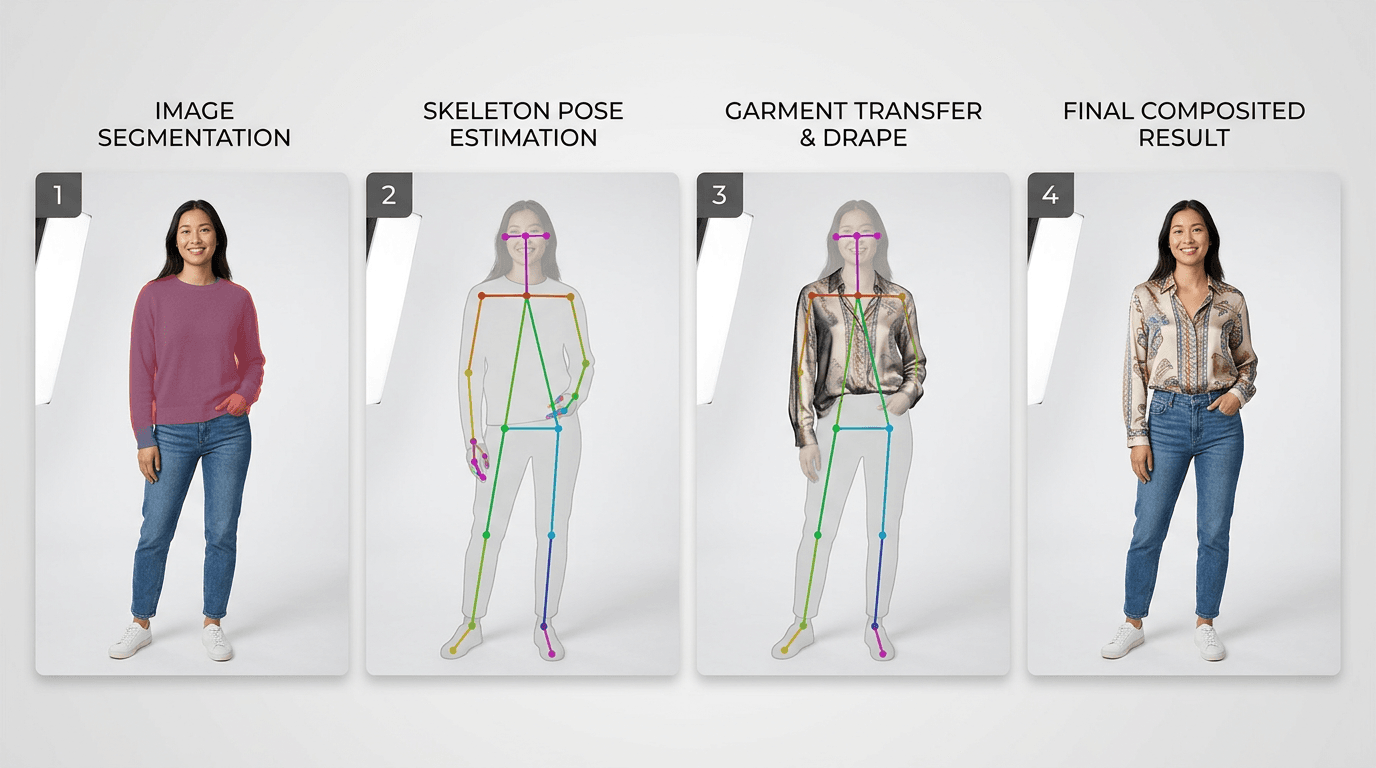
The less plain version is more interesting, because the word "AI" is doing a lot of hiding here. What is actually happening is a short pipeline of four separate machine learning problems, each of which was a research paper not that long ago and is now a line in somebody's API. You will see the same technology sold as a clothes swap ai, a virtual clothes changer, a dress changer, or a cloth changer ai. Under the hood they are doing the same four things.
How an AI Clothes Changer Swaps a Garment in a Photo
- Segment. The system finds the boundary of the existing garment in the photo. This is image segmentation, and the segmentation algorithm quietly determines whether your output looks right. If it bleeds into hair or a background object, everything downstream inherits the mistake.
- Map the body. Pose estimation builds a skeleton of where the shoulders, elbows, hips, and knees are, and infers body shape from it. That skeleton tells the model how the new garment has to bend.
- Generate. A diffusion model paints the new garment into the masked region, conditioned on both the pose skeleton and the reference photo of the clothing. This is where the fabric gets its drape, its shadows, and its wrinkles, and it is why modern systems do not need separate cloth simulation.
- Composite. The generated region is blended back into the original image, matching grain, color temperature, and edge softness so the seam does not show.
Four steps, and on a decent platform the whole thing runs in seconds rather than minutes.
The reason this advanced AI works now and did not work in 2021 is step three. Older approaches tried to warp a flat garment image onto a body like a decal, which is why early virtual fitting room demos looked like a sticker had been slapped on a photo. Generative AI does not warp. It repaints. That is the whole difference.
AI vs AR: Two Ways to Change Clothes Digitally
There are two families of technology here and brands mix them up constantly, usually right before buying the wrong one.
AR-based systems run live. The shopper's camera is on, the garment is tracked to their body in real time, and the whole thing happens on their device. It feels impressive in a demo. It also needs camera permission, decent lighting, a recent phone, and a shopper willing to stand up, and it has to calibrate before it shows anything.
AI-powered virtual try-on runs on an uploaded still image instead. No camera permission, no live tracking, no device requirements beyond a browser. Upload your photo, or the shopper's, and get a result back. It is less flashy and considerably more likely to actually get used.
For apparel specifically, the AI approach wins on adoption, which is the only metric that matters once the novelty wears off. Our full breakdown of both approaches lives in the complete technical guide to virtual clothes try-on.
Consumer Apps vs Business Tools, and Why the Difference Costs Ecommerce Brands Money
A free AI clothes changer online produces one image for personal use. An ecommerce grade platform produces thousands of consistent product images you are contractually allowed to sell against. The gap between them is not output quality. It is rights, repeatability, and integration, and that gap is where brands lose money by choosing wrong.
This is the section I wish someone had written before I had to explain it to a founder over a call. Here is the comparison laid out.
| Free consumer app | Ecommerce grade platform | |
|---|---|---|
| Commercial usage rights | Usually personal use only, often unclear | Explicit commercial license for listings and ads |
| Batch processing | One image at a time | Whole collections in one run |
| Catalog consistency | Every output looks slightly different | Locked lighting, framing, and virtual model across SKUs |
| Storefront integration | None, you download files | Native app or API into Shopify and other ecommerce platforms |
| Customer data handling | Often trains on your uploads | Contractual limits and audited controls |
| Output resolution | Web preview, watermarked | High-quality, print and zoom grade |
| Support and uptime | None | Contracted |
What Free AI Clothes Changer Online Tools Actually Give You
I do not want to be dismissive here, because the free tier of a good app is genuinely the right first step. You should use one. Spend twenty minutes, upload a real photo of a real product, and look hard at the output. That test tells you more than any vendor page will.
What you will find is that the single image is often excellent. Modern models handle drape, shadow, and color extremely well on a well-lit front-facing photo. The problems start on the second image.
Run the same garment on a second virtual model and the lighting shifts. Run a third and the crop changes. Now you have three product images that look like they came from three different fashion brands, which is exactly the impression a shopper forms in the half second before they bounce. Catalog work is not a quality problem. It is a consistency problem, and consistency is the thing free tools are structurally bad at, because they are optimized for one delightful result rather than four hundred identical ones.
Then there is the rights question, which almost nobody checks. A lot of free tools reserve broad licenses over what you upload and what they generate. If you are putting that image on a product listing and running paid traffic to it, read the terms first.
What an Ecommerce Grade Virtual Try-On Platform Adds
The paid tier is buying you four things that have nothing to do with how pretty the picture is.
Repeatability, first. The same garment, the same digital models, the same light, across every SKU in the drop. Batch, second, because a 300 SKU catalog processed one image at a time is a person's whole month. Rights, third, written down. And integration, fourth, meaning the images land in your storefront rather than in your downloads folder.
If you want the tool-by-tool version of this, we have compared the affordable virtual try-on clothes apps for DTC brands separately. This article is about the technology and the decision, not the shortlist.
How Ecommerce Brands Use AI Clothes Changer Technology
Brands use AI outfit swap in three places: generating on-model product photography for new SKUs, keeping a catalog visually consistent at scale, and producing fashion content that would otherwise need a separate shoot. All three replace production time rather than replacing a human decision.
Virtual Model Photography: Change Outfits Without New Photoshoots
The most common use, and the one with the clearest before and after.
Before: a new drop means booking a studio, a photographer, a model, and a stylist, shooting every garment, waiting on retouching, and publishing three to six weeks after the product physically exists. Nothing about that timeline is anyone's fault. It is just how fashion photography works.
After: you shoot one base session with your model in neutral clothing, or you use a licensed base model set. Every subsequent garment gets rendered onto that base, which removes the need for physical samples to be in the studio at the same time as the model. New colorway on Tuesday, listing live on Tuesday.
The output artifact is a set of on-model images at listing resolution, consistent with everything else in your catalog. That is the part that lets small teams save time without the storefront looking like it was assembled by three different people.
Product Images and Catalog Visualization at SKU Scale
Take a brand with 300 SKUs and four colorways each. That is 1,200 on-model images if you want every variant properly represented, which almost nobody does, which is why most apparel listings show one color and a color swatch and hope.
Generative outfit swap changes the maths on that. The marginal cost of the 1,200th image is close to the cost of the first. Suddenly showing every variant on a body is a rendering job rather than a budget conversation.
There is a real conversion argument underneath this. Shoppers who cannot visualize the actual colorway on a person are guessing, and guessing is what produces the return.
Marketing Assets, Social Content, and New Looks
Paid social eats creative. A brand running Meta ads at any real spend burns through variants faster than a production calendar can refill them, and creative fatigue is measurable within weeks.
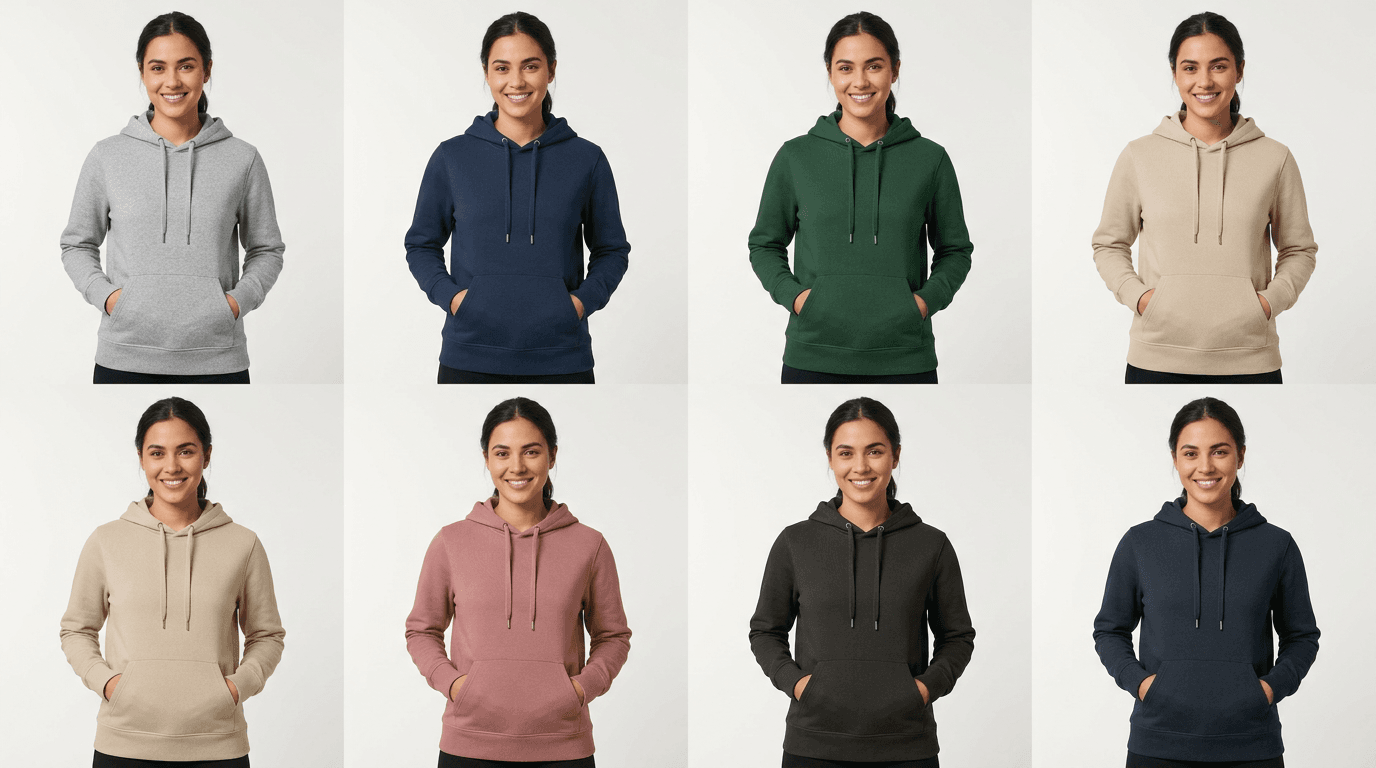
Outfit swap lets you generate new looks against the same garment. Different virtual model, different setting, different styling, same product. You get twelve ad variants out of one shoot instead of one, and you can kill the losers without feeling like you wasted a studio day.
AI Clothes Changer vs Virtual Try-On: What's the Difference?
An AI clothes changer is a production tool you run on your own images to make catalog assets. Virtual try-on is a customer-facing feature that runs on the shopper's photo, on your product page, at the moment they are deciding. Same underlying virtual try-on technology, opposite ends of the funnel.
People use the two terms interchangeably and it causes real confusion in vendor conversations, so here it is side by side.
| AI clothes changer | Virtual try-on | |
|---|---|---|
| Who supplies the photo | You do, from your shoot | The shopper does |
| When it runs | Before the listing goes live | While the shopper is on the product page |
| What it produces | Catalog and marketing assets | A personalized preview |
| Who sees the output | Every visitor | That one shopper |
| Where it lives | Your CMS and ad accounts | Your storefront widget |
| What it changes | Your production cost | Their purchase confidence |
Most brands eventually want both, and they are usually the same vendor, because the model that can render a garment onto your virtual model can render it onto your customer. But you should know which problem you are solving this quarter. If your bottleneck is producing images, that is the changer. If your bottleneck is shoppers bouncing because they cannot picture themselves in it, that is virtual try-on clothes territory.
Use Cases for Fashion Brands Using AI Outfit Swap
Six use cases that come up repeatedly with ecommerce stores in apparel:
- New product launches, where the listing goes live the day inventory lands rather than a month later.
- Seasonal restyling, taking the same core garments into autumn styling without a second shoot.
- Size and body representation, showing one garment on several different body types, which is expensive to shoot and cheap to render.
- A/B testing creative, running two versions of a hero image against real traffic for an actual answer.
- Wholesale line sheets and lookbooks that look finished before production samples exist.
- Marketplace expansion, reformatting the same catalog for a marketplace with different image specs.
The pattern across all six: the technology removes a scheduling constraint. It does not remove a taste decision. Somebody still has to look at the output and say yes or no, and brands that skip that step are the ones producing the uncanny listings everyone complains about.
Benefits of AI Virtual Try-On for Ecommerce Stores
The benefits split cleanly into two buckets. On the production side, AI clothes changer technology compresses the calendar between a product existing and its listing going live. On the storefront side, AI virtual try-on gives shoppers a way to visualize fit and color before they commit, which is what moves conversion rates and return rates.
Worth separating those, because they get sold as one thing and they are not.
Production benefits are immediate and entirely within your control. You save time, you publish faster, and you get catalog consistency for free because the same pipeline produced every image. No shopper has to do anything for you to get this.
Storefront benefits depend on shopper behavior, so they are slower and noisier. When you let shoppers try on clothes virtually on the product page, the mechanism is confidence. Someone who can see the garment on a body like theirs is making a decision instead of a guess. That tends to show up as better customer engagement first, then conversion, then eventually return rates, which lag the sale by weeks.
There is a third benefit people underrate: try-on experiences personalize the online shopping experience without needing an account, a quiz, or a recommendation engine. The shopper does one thing and the page becomes about them.
None of this is automatic. A virtual try-on widget buried behind a tab gets used by almost nobody, and then the brand concludes the technology does not work. Placement matters more than the model does.
Virtual Styling, Digital Fashion, and Multiple Outfit Combinations
Once you can swap outfits cheaply, a second capability shows up that most brands do not plan for: styling at scale.
If a shopper can try on outfits rather than single garments, you can show multiple outfit combinations from your own catalog on one body. The jacket with three different shirts. The dress styled two ways. That is virtual styling, and it is the closest thing ecommerce has to a shop assistant who says "this would work with that."
The commercial argument is basket size. A shopper looking at one product is buying one product. A shopper looking at an outfit is looking at three.
High-end fashion labels have pushed further into digital fashion, where garments exist only as renders, and there is a real virtual fashion market attached to that. I would be careful reading too much into it. For a working apparel brand, the value is not selling clothes that do not exist. It is photographing the ones that do, faster and cheaper, and letting people see them on a body before they buy.
ROI: AI Photoshoots vs Traditional Fashion Photography
The honest ROI case has two halves. Production savings are large and easy to measure yourself, because you already know what your last shoot cost. Return savings are smaller per unit but compound, because 19.3% of online sales came back in 2025 and each return costs about 27% of the item's price to process.
Let me do the arithmetic out loud, because most pages on this topic quote a vendor percentage and move on.
Production side. A modest on-model shoot means studio hire, a photographer, a model, styling, and retouching, and it produces a fixed number of finished garments for that spend. Generated imagery for the same garments is a subscription cost measured in credits. Rather than repeat somebody's marketing number at you, pull your last shoot invoice, divide by the number of usable images it produced, and compare that per-image figure against a monthly plan. The answer is usually not close. Note the shape of the saving though: it is not really money, it is calendar. Getting a listing live three weeks earlier is three weeks of that SKU selling.
Returns side. This is where a lot of published numbers are simply wrong, so use the primaries. The National Retail Federation and Happy Returns put the 2025 online return rate at 19.3% of sales, with total returns of $849.9 billion across US retail and 15.8% across all channels. Optoro's reverse-logistics research puts the cost of processing a return at roughly 27% of the item's purchase price, which can erase up to half the margin on the original sale.
Run that on a hypothetical $500,000 apparel store. Roughly $96,500 of merchandise comes back. Processing it costs something in the region of $26,000, before you count the margin you never earned. Move the return rate by even three points and you are looking at real money, which is why the fashion ecommerce conversation about virtual fitting keeps circling back to returns rather than to conversion.
What I will not do is promise you a specific reduction. Return behavior varies enormously by category, price point, and how generous your returns policy is. Measure your own baseline first.
What AI Clothes Changer Technology Still Gets Wrong
Every competitor page on this search skips this section, which is exactly why it belongs here.
Hands and fine detail remain the most common failure. Fingers near a garment edge, cuffs, cropped sleeves, and anything a hand is holding will produce retries. Complex fastenings are next: buttons, zips, buckles, and layered closures come back plausible-looking but wrong, and a zip that renders with an extra pull tab is a returned item waiting to happen.
Prints and logos are their own problem. Repeating patterns drift across the drape, and text on a garment comes back subtly mangled almost every time. If your product is a graphic tee, check every single output.
Unusual materials sit at the hard end too. Sheer fabric, heavy sequins, leather with strong specular highlights, and anything metallic all struggle, and complex 3D jewelry is genuinely better served by AR-based tools. Extreme poses degrade quality as well, because sitting, twisting, or crossing arms over the torso thins out the pose estimate and the generation follows it.
One more, stated honestly. Models handle a wide range of body types, but quality is not perfectly uniform across all of them, and it is on you to check output across the range your customers actually occupy rather than assuming. Dresses in particular are their own category of difficulty, and we wrote about why dresses are the hard case for virtual try-on separately.
Budget for a human review pass on every batch. A small percentage of failures across a 1,200 image catalog is still a couple of dozen images somebody has to catch.
How to Add Virtual Outfit Transformation to Your Store
- Audit your base imagery. Pull ten product photos and check resolution, lighting consistency, and whether the garment is fully visible. Generation quality is capped by input quality. This step is boring and it is the one that decides your outcome.
- Run a paid trial on ten real SKUs. Not your best ten. A representative ten, including one print, one dark fabric, and one awkward silhouette. Look at the failures, not the wins.
- Choose deployment mode. Catalog-side generation, customer-facing virtual try-on, or both. Most brands start catalog-side because it needs no storefront change and shows value immediately.
- Install and configure. On Shopify this is an app install rather than a development project, so the work is mostly catalog configuration rather than engineering.
- Measure against a baseline you wrote down first. Return rate, conversion, and time-to-listing, captured before you switch anything on. Give it a full 60 to 90 days, because return data lags the sale by weeks.
How Rooop Handles Virtual Outfit Visualization
Full disclosure, this is our product, so weigh accordingly.
Rooop is AI-powered rather than AR-based. Everything works from an uploaded photo, so there is no camera permission prompt and no device requirement beyond a browser, and the same setup handles both catalog-side generation and shopper-facing virtual try-ons. The platform covers three things: AI virtual try-on on the product page, AI model photoshoots for catalog imagery, and short shoppable video for social.
On output quality we hold to 99% visual fidelity on the try-on images, which is the number that matters for a product page, because a listing image gets zoomed. What we do not do is pretend the remainder does not exist. Check your batches.
Install on Shopify is one click, with no code required. WooCommerce and BigCommerce are on the roadmap rather than shipped, which is worth knowing before you plan around it.
Pricing as of 3 August 2026, taken from rooop.app: Starter at $24 a month for 150 credits, Pro at $119 a month for 600 credits, and Business at $399 a month for 1,200 credits, with higher concurrency and earlier feature access as you go up. Annual billing takes 20% off every tier. Details are on rooop.app.
Where we are not the right answer: complex 3D jewelry, where AR-based tools handle reflections better than we do. Very small catalogs, where a single shoot covers you for the year. And any brand whose base photography is genuinely bad, because no amount of AI technology generates its way out of a soft, badly lit source image.
If you sell apparel and you want the business case rather than the technology, the virtual try-on for clothing brands page has the detail.
The Future of Virtual Try-On and AI in Fashion
Two things look likely over the next couple of years, and one is much less certain than vendors will tell you.
The likely one: generated imagery becomes the default for catalog work and nobody remarks on it, the way nobody remarks on retouching now. The cost gap is too large for the fashion industry to go any other way, and the quality gap is closing fast on everything except the failure cases listed above.
The less certain one is the future of virtual try-on as a standard fixture on every product page. Adoption is real but uneven, and the brands seeing the biggest lift are the ones who made it obvious and easy rather than burying it behind a tab. Shoppers increasingly expect to try things at home rather than in a fitting room, which pushes fashion retail in the same direction.
What I would not bet on is the metaverse-adjacent version of the future of fashion, where digital garments exist mainly to be worn by avatars. Maybe eventually. The money right now is unambiguously in making real clothes easier to photograph and easier to buy.