

Key Takeaways
- AI virtual try-on synthesizes a new image of the shopper wearing the product from a photo they upload. AR virtual try-on overlays a 3D model onto a live camera feed. Every other difference follows from that one.
- AR needs a modeled 3D asset for every SKU, at roughly $150 to $1,500 per production-ready model (Cad Crowd). AI virtual try-on reuses the product images you already own.
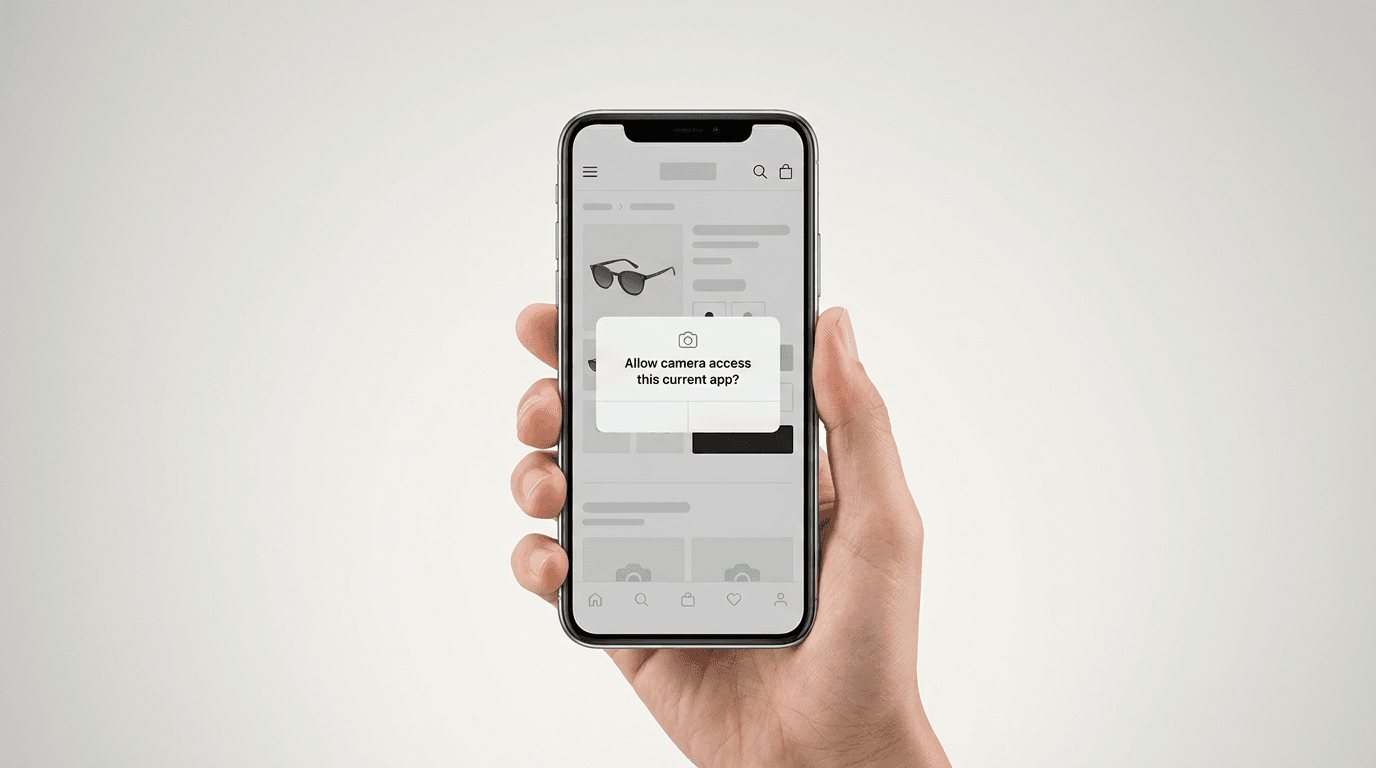
- AR needs camera permission before the shopper sees anything at all. That prompt is a funnel step, and it fires at the worst possible moment in the shopping experience.
- AI wins on soft goods, because fabric drape is the hardest thing to simulate in real time and the easiest thing for a generative model to reproduce. AR wins on eyewear, virtual makeup, and anything the shopper needs to rotate.
- Neither camp has a vendor average worth planning on, ours included. Independent case studies put conversion lifts at 15 to 40% and return reductions at 20 to 35% (AiShirt, Virtual Try-On Buyer's Guide for Ecommerce 2026), so run the break-even on your own return costs and confirm it with a holdout test.
Two vendor demos, back to back. The first asks you to allow camera access, waits, then puts a pair of sunglasses on your face and lets you turn your head. The second asks you to upload a photo and hands back a picture of you in a jacket three seconds later.
Both of those are virtual try-on. They share almost no engineering.
That is the actual question behind AI vs AR virtual try-on. Not which is newer. Which architecture your catalog, your traffic, and your budget can carry. Pick wrong and you find out eighteen months later, when someone asks why the try-on rate is 3% and the answer turns out to be a permission prompt nobody modeled.
So here is the comparison with the consequences left in. What each type of virtual try-on technology renders, what it demands from you, where it falls apart, and how to split a mixed catalog between the two. If you want the category defined from scratch first, the complete guide to virtual try-on technology covers it end to end.
What's the Difference Between AI Virtual Try-On and AR Try-On?
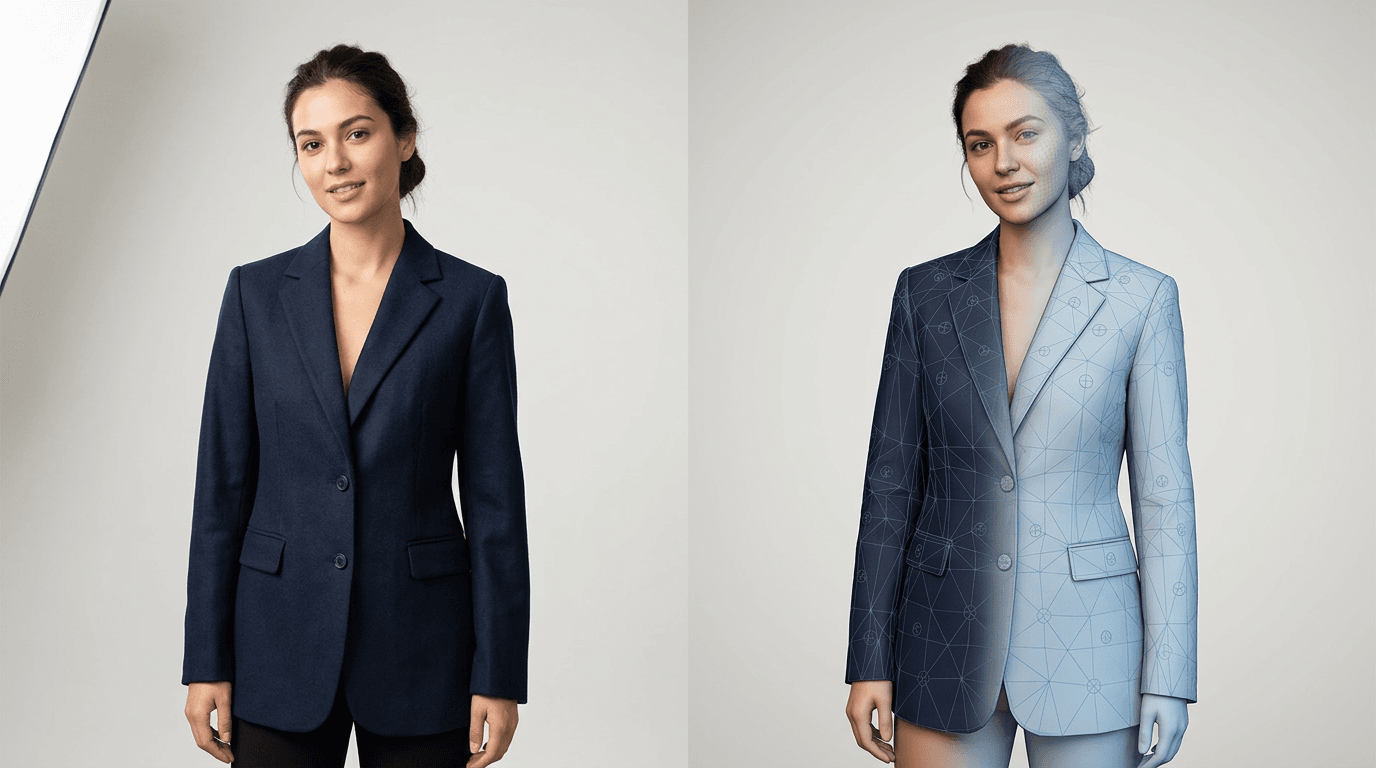
AI virtual try-on generates a new image of the shopper wearing the product, using a photo they upload and the flat product images already in your catalog. AR virtual try-on anchors a 3D model of the product to the shopper's face or body in a live camera feed. One produces a picture. The other produces a session.
That distinction sounds academic until you follow it downstream. A picture can be saved, shared, and produced on any device with a browser. A session needs a camera, a permission grant, a tracked face, and enough GPU on the phone to hold frame rate.
| AI virtual try-on | AR virtual try-on | |
|---|---|---|
| Core method | Image synthesis | Live overlay on a camera feed |
| Input per SKU | Existing product image | Modeled, textured 3D asset |
| Asset cost per SKU | None | Roughly $150 to $1,500 |
| Shopper input | One uploaded photo | Live camera stream |
| Camera permission | Not required | Required |
| Output | A finished visualization | A real-time interactive view |
| Viewing angles | One per generation | Rotatable, multi-angle |
| Device support | Any browser, any device | Newer phones, AR-capable hardware |
| Steps before first render | One photo upload | Asset load, then permission, then tracking lock |
| Best at | Apparel, drape, body shape | Eyewear, makeup products, rigid geometry |
| Weakest at | Rotation and multi-angle inspection | Fabric behavior and catalog scale |
| Time to launch a catalog | Hours | Weeks to months |
Read that table twice and you have most of the article. The rest is why each row is true.
One axis this piece deliberately leaves alone is the 2D versus 3D asset question, which is about what format your product data sits in rather than what engine renders it. That gets its own treatment in 2D vs 3D virtual try-on, including the full per-SKU 3D modeling math for a real catalog.
How AI Virtual Try-On Works, From Computer Vision to Generative AI
AI virtual try-on works in four steps: the shopper supplies a photo, computer vision locates their body landmarks, a generative model redraws the product onto that body with correct drape and lighting, and a finished image comes back. No camera stream, no 3D object, no app.
- The shopper uploads a photo, or picks one of the store's model images.
- Computer vision finds body landmarks. Shoulders, waist, hips, limb angles, and the outline separating the person from the background.
- AI algorithms take the flat product image from your catalog and re-render it onto that body, with the right drape, the right occlusion, and lighting that matches the original photo.
- One finished visualization comes back, on the same product page, in seconds.
Computer Vision Finds the Body in the Photo
This part is unglamorous and load-bearing. Before anything can be rendered, the system has to know where the person is, which way they are facing, and where the garment should sit. Get the shoulder line wrong by ten degrees and the jacket looks pinned on.
The useful property here is that photos are forgiving. A still image can be re-analyzed, retried with a different model, and rejected outright if the pose is unusable. A live camera feed gets one shot per frame at 30 frames a second and has to be right the first time.
Generative AI Redraws the Product Onto the Shopper
The engine is a diffusion model, the same class of generative AI behind image generators. It does not paste. It redraws.
That is the whole difference in fidelity. A sleeve does not get scaled and positioned, it gets drawn falling the way sleeves fall on that particular arm at that particular angle. A knit reads as a knit. The shadow under the hem lands where the model learned hems cast shadows, from photographs of real clothes on real people.
Rooop hits 99% visual fidelity on apparel this way, with fallback handling for edge cases like unusual poses and low-light photos, so a submission that the first pass cannot use gets picked up rather than dropped. This is what advanced AI buys you over a scaling algorithm.
Product Overlay or Image Synthesis?
Worth separating two things that both get called AI virtual try-on, because they are not the same product.
The old approach is overlay. A transparent PNG of a shirt gets scaled and positioned over a photo. Fast, cheap, and it looks exactly like what it is. Shoppers do not trust that kind of preview and it does not move any number you care about.
The current approach is synthesis. The garment is generated onto the shopper, not placed on top of them. When someone says AI-powered virtual try-on now, this is what they mean, and it is the only version worth paying for.
How AR Virtual Try-On Works, From Camera Access to 3D Rendering
AR virtual try-on works in four steps: the shopper grants camera access, the device tracks their face or body in real time, a pre-built 3D model of the product is anchored to those tracked points, and the result renders live at interactive frame rates. Every SKU needs its 3D asset built first.
- Every SKU gets modeled and textured, in CAD software or by photogrammetry, producing a digital product with real material properties.
- The shopper grants camera permission and the live stream opens.
- An augmented reality framework such as ARKit or ARCore, or the browser-side WebXR API, detects and tracks the face or body.
- The 3D product is anchored to those tracked points and rendered live, with physics or cloth simulation on top if the product is soft.
Camera Access and the Permission Prompt
Here is the part nobody puts in the comparison table, and it deserves its own paragraph.
AR try-on cannot start without camera permission. The browser fires a system-level prompt asking a shopper to grant a stranger's website access to their camera, and it fires before they have seen a single rendered frame. They have received no value yet. They are being asked to pay first.
Some online shoppers say yes. Some say no. Some denied camera access to that browser months ago and will never see the prompt again, which means the try-on silently does nothing at all. On a store where roughly 70% of traffic is mobile, that is not a rounding error. It is a funnel stage, and it sits in front of the experience you paid for.
An AI virtual try-on that takes a photo upload skips this entirely. The shopper picks a file. That is it.
Real-Time Tracking
Once permission is granted, the tracking is genuinely impressive. Face meshes lock on in a fraction of a second, and modern frameworks hold the anchor through head turns, expression changes, and moderate motion blur.
For anything that sits on a rigid landmark, this is exactly right. Glasses need to stay on the bridge of a nose while the head turns. That is an anchoring problem, and using augmented reality solves anchoring properly in a way image synthesis cannot.
3D Rendering and the AR App Problem
The rendering itself runs on the shopper's device, which sets a hardware floor. It also sets a weight limit, because every 3D model, texture, and material has to download before the first frame appears.
Then there is distribution. Some AR virtual try-on solutions ship as a native AR app, which is where a lot of retail AR quietly goes to die. Asking a shopper to install an AR app to consider a $60 purchase is a losing trade. WebAR removes the install but inherits both the permission prompt and the asset weight.
Pros and Cons of AI and AR Virtual Try-On by Product Category
Neither technology is better in general. AI wins where the product deforms, because generative models reproduce fabric behavior better than real-time cloth simulation does. AR wins where the product is rigid and needs to stay anchored to a tracked landmark, or where the shopper needs to rotate it.
| AI virtual try-on | AR virtual try-on | |
|---|---|---|
| Pro | No per-SKU asset cost | True multi-angle interactive experience |
| Pro | Works on every device | Genuinely immersive for face-worn items |
| Pro | No permission prompt | Live feedback as the shopper moves |
| Pro | Whole catalog live in hours | Excellent for rigid geometry |
| Con | One viewpoint per generation | 3D asset required per SKU |
| Con | Not live or interactive | Permission prompt before any value |
| Con | Depends on photo quality | Fabric simulation is expensive and unconvincing |
| Con | Extreme poses can fail | Hardware floor on older phones |
Where AI Virtual Try-On Wins: Clothing, Jewelry, Accessories
Clothing is the clearest case. The purchase question is how a garment falls on a body like the shopper's, and that is a deformation problem, not a geometry problem. Simulating fabric weight, stiffness, and weave in real time is the most expensive and least convincing part of building virtual try-on in 3D. A diffusion model trained on real photographs gets there without simulating anything, because it learned what the answer looks like.
Jewelry and accessories follow for a different reason: catalog size. A 400-SKU jewelry line means 400 3D models before a single shopper sees anything. With AI virtual try-on those 400 products are already photographed, so they are already ready. Letting people try on clothing, rings, and bags across an entire catalog in an afternoon is a scale property, and it only exists on the AI side. Shoppers can virtually try on products from a seasonal drop the same week you photograph it.
Skin tone and body diversity are worth naming here too. Because the shopper's own photo is the canvas, the visualization matches the person looking at it rather than approximating them with the nearest avatar. That is a real personalized shopping outcome rather than a marketing word.
Where AR Virtual Try-On Wins: Glasses, Makeup, Hair
Eyewear is AR's home category and it is not close. Frames are rigid, they anchor to a face, and the buying decision genuinely depends on rotation. Does the temple sit right above the ear? How wide does the frame read from three-quarter view? A still image cannot answer that. An AR-powered virtual try-on can.
Virtual makeup is the other strong case. Lipstick, foundation, and eyeshadow are surface treatments applied to a tracked face mesh, with almost no geometry involved, and shoppers want to see the shade shift as they move. A virtual makeup try-on that updates live is a different and better product than a static swatch. Hair color behaves the same way.
If you sell eyewear or makeup products, take AR seriously. That is not the answer that helps us sell anything, and it is still the right answer.
Implementation Complexity: Building Virtual Try-On With AI vs AR
Implementing AI virtual try-on is a software integration. Implementing AR virtual try-on is a content production project with a software integration attached. That is the honest summary, and it is why the timelines differ by weeks rather than hours.
Implementing virtual try-on is where the two paths stop resembling each other, and the gap shows up on your calendar long before it shows up in the virtual try-on experience a shopper sees.
Implementing a virtual try-on solution built on AI, for Shopify or WooCommerce, looks like this:
- Install the app or plugin on your store.
- Point it at the product catalog it should cover.
- Place the try-on button on the product page template.
- Test a sample of SKUs and go live.
Average implementation time across Rooop customers is 2 to 4 hours. No developer required for a standard Shopify install, which is most of why small teams can integrate virtual try-on technology at all.
Building virtual try-on with AR looks like this:
- Audit which SKUs are AR-viable in the first place.
- Commission or produce a 3D model for each one, then texture and validate it.
- Integrate the AR SDK or WebAR layer into the product page.
- Test across a device matrix, because behavior varies by phone.
- Build a fallback for every shopper who denies permission or arrives on unsupported hardware.
Step 5 is the one that surprises people. An AR-only implementation has to answer "what does this shopper see instead?" for a meaningful share of traffic, and answering it well usually means shipping a second experience alongside the first.
Cost Comparison: AI vs AR Virtual Try-On Solutions
AI and AR virtual try-on cost money in structurally different places. AI cost is a subscription or per-try-on fee with no asset creation at all. AR cost front-loads into 3D model production per SKU, which scales with catalog size and recurs every time you launch new products.
| Cost line | AI virtual try-on | AR virtual try-on |
|---|---|---|
| Per-SKU asset creation | None | ~$150 to $1,500 per model |
| Software fee | Subscription or usage-based | Subscription or usage-based |
| Engineering time | Hours | Days to weeks |
| Ongoing new-product cost | Reuse the product photos | New 3D model per new SKU |
| Fallback experience | Not needed | Usually needed |
The per-model figure decides most of these projects. It comes from independent 3D production pricing (Cad Crowd, pixready) and it does drop at catalog scale, but not enough to change the shape of the problem. Forty hero SKUs is a project. Two thousand SKUs is a different company. A retailer sitting between those two numbers should price the middle case honestly before talking to any vendor.
Published software pricing runs wider than most buyers expect, from under $10 a month at the entry tier up to four figures for enterprise plans, so any single market average is a bad planning number. Rooop sits in the middle of that spread at $24, $119, and $399 a month, with 20% off annual billing. The full breakdown of subscription, usage, and asset-fee models lives in the virtual try-on pricing guide, and vendor-by-vendor feature comparison sits in virtual try-on software.
Accuracy Comparison: Which Virtual Try-On Looks More Realistic?
Realism depends on what is being rendered. For rigid products anchored to a face, AR is more accurate, because it renders true geometry from the actual viewing angle. For clothing on a body, AI is more accurate, because reproducing learned fabric behavior beats simulating it.
There is a second kind of accuracy that gets ignored, and commercially it matters more: does the shopper see themselves, or an approximation of themselves?
AI try-on renders onto the shopper's own photo, so the body in the picture is their body. AR renders onto the shopper's live face, which is also them, but any AR implementation that dresses a generic 3D avatar instead has quietly reintroduced the exact imagination gap the technology existed to close. A realistic virtual try-on has to look like the customer, not like a mannequin who shares their measurements.
On speed the numbers are not symmetrical, and it would be dishonest to pretend otherwise. Once AR assets have loaded and tracking has locked, AR renders continuously at interactive frame rates, which is faster than any generated image. The cost sits in front of that: permission, asset download, tracking acquisition. A photo upload has none of those steps, so the shopper reaches a finished visualization through one action rather than three.
Academic work on image-based try-on backs the trade-off from the other direction. Image-based approaches are limited to a fixed viewpoint, while 3D approaches depend on parametric human models and large 3D datasets that are expensive to build (IPVTON, arXiv 2501.15616).
Which Retailers Should Choose AI Virtual Try-On?
Choose AI virtual try-on if you sell soft goods, carry more than a hundred SKUs, run mostly mobile traffic, or need the whole catalog covered quickly. It is the right default for apparel and accessories in online retail.
Most online retailers in those categories land here, and the reason is arithmetic rather than preference.
Use cases where AI is the correct call:
- Apparel brands of any size, because fabric is the entire purchase decision.
- Catalogs above roughly 100 SKUs, where per-model 3D costs stop being survivable.
- Stores with heavy mobile traffic and mid-range devices.
- Jewelry and accessories lines that refresh seasonally.
- Teams without engineering capacity, since a standard install runs in hours.
- Any retailer who wants shoppers to try products across the whole catalog rather than a hero selection.
A small DTC brand with 60 SKUs and no developer is the clearest case of all, which is the scenario the small business virtual try-on guide is written for. If your framing is fit and sizing rather than appearance, the virtual fitting room technology guide is the better starting point.
Which Retailers Should Choose AR Virtual Try-On?
Choose AR virtual try-on if the product is rigid, sits on a tracked facial landmark, or has to be rotated before someone will buy it. Eyewear, cosmetics, watches, and rings are the categories where AR earns its cost.
Use cases where AR is the correct call:
- Eyewear retailers, without qualification.
- Cosmetics brands doing lipstick, foundation, or eyeshadow shade matching.
- Watch and ring sellers where wrist or hand placement and rotation drive the sale.
- Small, high-value catalogs where a per-SKU 3D model is a rounding error against margin.
- In-store kiosks and smart mirrors, where hardware and lighting are controlled and the permission problem does not exist.
That last one deserves expanding, and the virtual mirror comparison does it properly.
Why Rooop Uses AI and Not AR for Maximum Fidelity
Full disclosure before this section does anything: Rooop is our product, and we chose AI. Read the reasoning rather than the conclusion.
Rooop is AI-first, built on photo upload rather than a live camera. It redraws products onto the shopper's own photo at 99% visual fidelity, with no camera permission, no app install, and no 3D asset required for any SKU.
The reasoning was mostly about what happens outside the demo.
Apparel is the largest ecommerce category and the one AR handles worst, because cloth simulation is where real-time 3D rendering is weakest. Around 70% of ecommerce traffic is mobile, where AR asset weight and hardware variance hurt most. And a permission prompt in front of the experience is a conversion cost that no amount of rendering quality pays back.
So Rooop takes a photo instead. It runs on Shopify, WooCommerce, and BigCommerce, installs in 2 to 4 hours, and has fallback handling for unusual poses and low light rather than an error message. An API is available for teams that need custom virtual try-on solutions on platforms we do not ship a plugin for.
Now the limitation, plainly. Rooop returns one viewpoint per generation. The shopper cannot rotate the result. If your product only sells when someone can turn it, or if it lives on a face at a precise angle, AR is the better technology and we are not the right vendor. Sunglasses are a real example. We would rather say that here than after you sign something.
More detail on the fidelity claim sits in why Rooop converts better than traditional VTO, and the product itself is at AI virtual try-on.
Benefits of Virtual Try-On for Online Shopping and Customer Experience
Both technologies produce the same commercial effect when they work: shoppers stop guessing. Independent 2024 to 2025 case studies put conversion lifts at 15 to 40% and return-rate reductions at 20 to 35% on the SKUs where try-on is switched on (AiShirt, Virtual Try-On Buyer's Guide for Ecommerce 2026). Rooop has not published a controlled study across its own customers, so we are not going to hand you a percentage we cannot defend.
The mechanism is not complicated. Roughly 19.3% of online sales came back as returns in 2025 (National Retail Federation and Happy Returns), apparel runs above that average, and processing a return costs somewhere near 27% of the purchase price once shipping, restocking, and inspection are counted (Optoro). A lot of that volume is a single shopper ordering three sizes because the product page gave them no way to visualize the fit. A virtual try-on feature answers the doubt before the order exists rather than after.
Say the quiet part first, though. Vendor averages in this category are close to worthless, and any vendor, us included, can produce a flattering number by choosing which stores to count. DRESSX studied more than a million luxury fashion shoppers for its 2026 report and found try-on users converted 50% higher, added to cart about 3x as often, and viewed 7x as many product listings (DRESSX, AI Virtual Try-On Report 2026). Read the top of any of these ranges as a best case on a well-chosen category rather than a forecast for your catalog.
The size of the effect is not evenly spread, and what it depends on maps closely onto the AI versus AR decision itself:
- How much of the hesitation is appearance rather than fit. Eyewear, jewelry, bags, and watches are close to pure appearance decisions, so one image answers the shopper's real question outright. Apparel keeps a layer of residual fit risk that no rendering engine removes, because seeing how a jacket looks on you does not tell you the sleeve length is right.
- What your current return reasons actually say. A skew toward "did not look how I expected" means try-on is aimed at your problem. A skew toward "did not fit" means a sizing tool will do more.
- How unrepresentative your product photography is now. A catalog shot on one model who looks nothing like most of your customers leaves the biggest gap for try-on to close.
- Price point. Expensive enough that shoppers hesitate, cheap enough that they do not expect to inspect it in person, is the band where try-on does the most work.
- Device mix. With around 70% of ecommerce traffic on mobile, an engine that struggles on mid-range phones gives its lift back before you can measure it. That is the AR-specific version of this risk, and it is the reason the architecture choice and the business case are the same conversation.
You can size the return side before you talk to any vendor. Take a month of orders in the category you would switch try-on on for, multiply by your return rate in that category, then by your average order value, then by 0.27, which is Optoro's share-of-price estimate for handling a return. That is roughly what returns cost you there each month. Divide the annual cost of the tool by the annual cost of those returns and you have the percentage reduction it has to deliver just to pay for itself. Compare that against the bottom of the published 20 to 35% range rather than the top.
Two conditions on measuring it afterward. Run a holdout, meaning try-on live for half your traffic in one category rather than all of it, because a before-and-after comparison measures your season instead of your software. And give it a full return window plus a quarter, since a reduction only lands in your numbers long after the orders it applies to.
There is a softer benefit that does not sit in any of that arithmetic. Customer satisfaction rises when the online shopping experience stops requiring imagination, and customer engagement rises with it, because a shopper who can visualize products on themselves stays on the page long enough to consider a second one.
Worth noticing what this does to personalization. Virtual try-on technology allows a store to personalize the product page without collecting a single extra data point, because the thing doing the personalizing is the shopper's own photo. You do not have to profile anyone to personalize what they see.
Virtual Try-On Tools and Features to Look For in Either Technology
Whatever engine you land on, good try-on tools share a checklist. Work down it in a demo and most vendors sort themselves out in ten minutes.
- Fidelity you can inspect at full size. Ask to see the output zoomed in, not in a thumbnail carousel. Thumbnails hide everything.
- Speed to first result. A few seconds is achievable on the AI side. On AR, ask specifically about time from tap to tracked frame, including asset download.
- Device coverage. Ask what happens on a three-year-old mid-range Android phone, and get a straight answer.
- No hard dependency on an install. Any virtual try-on tool that requires an app download loses most of its traffic at that step.
- Catalog coverage economics. Find out what it costs to add SKU number 501, not SKU number 1.
- Fallback behavior. What does a shopper see when permission is denied, the photo is unusable, or the render fails?
- Integration surface. A native Shopify or WooCommerce app for standard stores, plus an API if you need custom virtual try-on solutions.
- Data and privacy posture. Shopper photos and camera streams are personal data. Ask where they go, how long they are kept, and what certifications back the answer.
Two of those get skipped in almost every evaluation, and they are numbers 5 and 6. They are also the two that decide whether the thing still works a year from now.
Using AI and AR Together, Online and In-Store
The framing of AR and AI as rivals is mostly a vendor artifact. Retailers with mixed catalogs generally end up using both, and the split is usually obvious once you stop looking for a single winner. Using AR on the SKUs that need it and AI everywhere else is a normal outcome rather than a compromise.
The common pattern is AI virtual try-on across the entire catalog for coverage, with AR reserved for the small set of SKUs where a shopper genuinely needs to interact with products from multiple angles. An apparel brand with a sunglasses capsule is the textbook case. The clothes go through image synthesis, the eyewear gets 3D models, and nobody has to pretend one engine is good at everything.
Channel matters too. Online and in-store are different constraint sets. A virtual mirror or kiosk in a physical store runs on hardware you own, in lighting you control, with a customer who is already standing there, so the permission and device problems that make AR expensive on the open web mostly evaporate. In-store is where AR-powered virtual try-on looks best. On a mobile web product page at 11pm, AI usually wins.
The one thing worth avoiding is running both engines on the same SKU. Two different renderings of the same jacket that disagree with each other is worse than either one alone.
Choosing the Right Virtual Try-On Technology, a Decision Framework
Five questions, in order. The first one that gives a hard answer usually decides it.
- Does the shopper need to rotate the product to buy it? If yes, budget AR for those SKUs. If no, AI covers you.
- Does the product deform on a body? Anything soft leans AI on quality grounds, not just cost, because generative rendering currently beats real-time cloth simulation for fabric.
- Multiply your SKU count by $300. That is a conservative mid-range for one 3D model. If the total is not survivable, AR cannot cover your catalog and the decision has already been made for you.
- What share of your traffic is mid-range mobile? A heavy mobile skew punishes asset loading and permission prompts. Photo-based AI try-on runs in any browser with no camera access and no install.
- If you are still undecided, split it. Run AI across the entire catalog for coverage and commission AR only for the handful of SKUs where rotation genuinely closes the sale.
Most mixed catalogs land on question 5, and that is a legitimate answer rather than a dodge.